> For the complete documentation index, see [llms.txt](https://engyon.gitbook.io/engyon/llms.txt). Markdown versions of documentation pages are available by appending `.md` to page URLs; this page is available as [Markdown](https://engyon.gitbook.io/engyon/en/reference/notifications-and-assigned-tasks.md).
# Notifications and assigned tasks
Which event appears in assigned tasks and which appears in Notifications.
On these screens, users can see what is assigned to them and what just happened for them, so they know which panel to open.
Two panels sit at the bottom left.
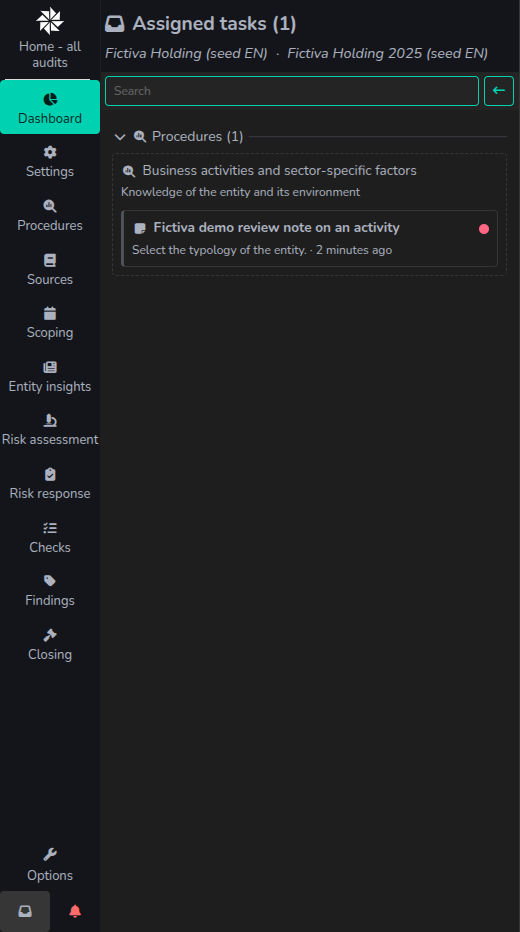
* The icon (inbox) :inbox:opens Assigned tasks. A row means you are assigned to that item and it is not finished yet.
* The icon (bell) :bell:opens Notifications. A row is a message about something that just happened.
The Assigned tasks panel, opened on Dashboard.
The Notifications panel, opened on Risk assessment.
Engyon does not send an email for these panels.
When you are in an audit, Assigned tasks shows the tasks of that audit, including the tasks on the component audits. Anywhere else it shows every audit you can open. Notifications is always your full list, newest first.
{% hint style="info" %}
A published file request and an upload by the client do not add a row to either panel. The client sees a published request in Sources. An auditor sees an upload there as a status change.
{% endhint %}
## What appears where
| What happens | Assigned tasks | Notifications |
| ------------------------------------------------------------------- | ------------------------------------------------------------------------------------------------------------------------------------- | -------------------------------------------------------------------------------------------------------- |
| A procedure is assigned to you | The procedure, until the status is completed or you are unassigned. waiting for review does not remove the row. | A message that the procedure was assigned to you, with the name of the person who did that. |
| A procedure is unassigned from you | The row disappears. | A message that the procedure was unassigned from you. |
| A phase is assigned to you | The procedures under that phase. The phase itself is not a row. | One assignment message per procedure. |
| A finding is created with you as an assignee | The finding, until it is completed or you are unassigned. | A message that the finding was assigned to you. |
| An existing finding is assigned to you or unassigned from you later | The row appears or disappears. | No message. |
| A risk, check, test plan, chapter, or section is assigned to you | That item, until it is completed or you are unassigned. | No message. |
| A review is requested from you | The review, next to the item the review is about, until the review is completed. | No message. |
| A review note is assigned to you | The review note, until it is closed or you are unassigned. | No message. |
| A file request is published | No row, unless someone is also assigned. The client sees the request in Sources. | No message. No email. |
| A file request is assigned to you | The request. The row stays when the status is ready. The row disappears when you are unassigned. | No message. |
| The client uploads a file | No new row. If you were already assigned, the same row stays. | No message. No email. |
| Clarification is requested on a file request | No new row. Whoever is assigned still sees the same row, with status clarification required. | No message. |
| Your agent finishes changes that still need review | No row. | A message that your agent made changes in this audit for you to review. |
| A colleague keeps or undoes changes your agent made | No row. | One message with that colleague's name. |
| Someone from another organisation invites you to an audit | No row. | The invitation, with the name of the audit firm. You can open the audit after you accept the invitation. |
## Related
* [Setting up client access](/engyon/en/how-to-guides/sources/set-up-client-access.md)
* [Closing a procedure](/engyon/en/how-to-guides/procedures/closing-a-procedure.md)
* [Create a review note](/engyon/en/how-to-guides/checks-and-findings/create-a-review-note.md)
* [Invite a user from another organisation](/engyon/en/how-to-guides/audit/invite-a-user-from-another-organisation.md)