> For the complete documentation index, see [llms.txt](https://engyon.gitbook.io/engyon/llms.txt). Markdown versions of documentation pages are available by appending `.md` to page URLs; this page is available as [Markdown](https://engyon.gitbook.io/engyon/en/reference/checks/test-plan-per-line-item.md).
# The test plan per line item
### Opening the test plan per line item
You open the test plan per line item in one of these ways:
* In the procedures menu, under Execution, open the line item. Above the procedures it says financial statement line item and the name of that line item. Click the go-to icon (:arrow-up-right-from-square:, tooltip Go to) to open the test plan of the line item.
* On Checks or Risk response, click the name of the line item whose test plan you want to open.
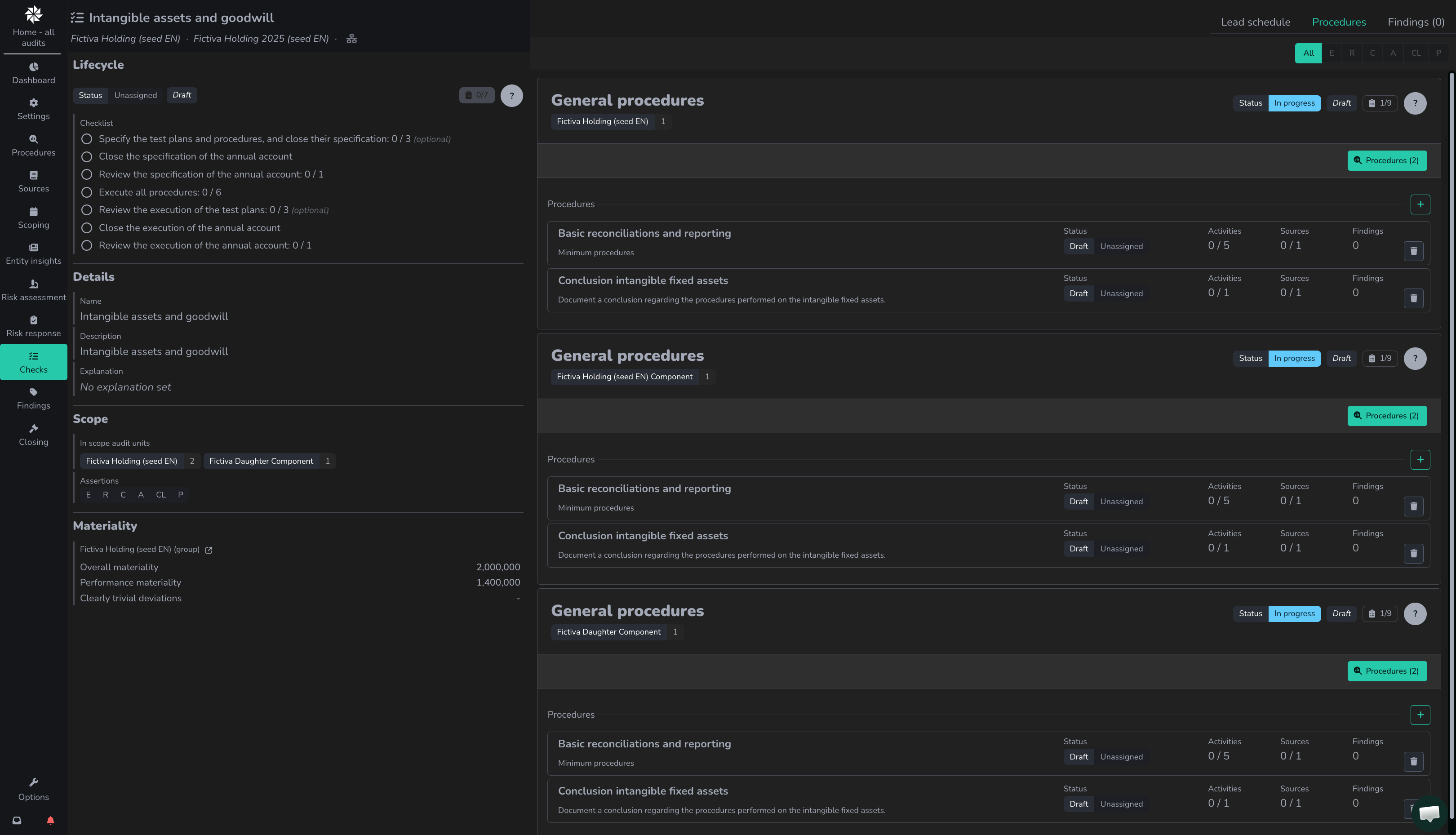
On this screen, users can view and manage the test plan per line item, including lead schedule, procedures, and findings. If a line item is in scope, it is shown in bold and is visible under Checks. If you click on a line item, you will see the line item, materiality, and values on the left side of the line item's details screen.
### Test plan
The test plan of a line item consists of different components (see tabs at the top right):
* `Lead schedule` (*lead schedule*)
* Procedures
* Findings
Lead schedules are automatically shown after importing the trial balance, see [ingesting a trial balance](/engyon/en/how-to-guides/importing-figures/ingesting-trial-balance.md) for how to do this. On a group audit you also open a component there down to the general ledger accounts. Copy the rows you see into Excel with the copy icon (:copy:, tooltip `Copy to clipboard`). A component you have opened is included. Collapsed rows are not.
Procedures shows all planned procedures on a line item:
* General procedures - these procedures are automatically generated when a line item is put in scope.
* Specific procedures per risk per assertion - these procedures still need to be added and reviewed.
### **Copy or link substantive procedures to different test plans**
A test plan belongs to a financial statement line item, an assertion, and an audit unit (and, if it exists, a source record group). It does not belong to one risk. If two risks are on that same combination, they share the test plan. The executed procedure is then on both risks. There is nothing to link.
{% hint style="info" %}
**Separating procedures**\
If you want to keep the procedures of two risks on the same line item and assertion separate, link the risks to separate subcategories (general ledger account groups) of that line item. Each subcategory gets its own test plan.
{% endhint %}
If the risks are on the same line item but on a different assertion, you hang the executed procedure on the empty test plan. Open the risk via Risk Progress. Click in the empty test plan on the plus icon (:plus:, tooltip `Voeg een werkzaamheid toe`). Open for that procedure occurrences with the magnifying glass icon (:magnifying-glass:) and click the executed procedure. Confirm `Weet je zeker dat je de werkzaamheid ‘…’ aan het controleplan wilt toevoegen?`
From a test plan that already has procedures, you can also copy or link them to another test plan of the same risk. Use the copy icon (:copy:, tooltip `Kopieer of link werkzaamheden naar andere controleplannen`) and choose Copy or link.
This remains within one financial statement line item: the library is per line item. Across line items it is only possible for procedures that are in every library (such as 'analysis of non-routine and unusual journal entries', 'Audit consolidation', 'Related parties', 'minutes correspondence', 'compliance with relevant laws and regulations').
Procedures hang on a test plan per line item and assertion. Link the risk to both line items and hang the procedure on the other test plan. You cannot copy or link general procedures that have no risk to another audit unit.
### Lifecycle of the test plan
The lifecycle controls the status of the planning on a specific line item. A test plan goes through the statuses `draft`, `in progress`, `waiting for review`, and `completed`.
To add or remove procedures, the test plan must be in `draft`. If the specification is already closed, first choose reopen specification to place the test plan back in draft.
## Related how-tos
* [Werkzaamheden op het controleplan zetten](/engyon/en/how-to-guides/checks-and-findings/adding-procedures-to-the-test-plan.md)